For UGC creators on iPhone
A UGC video editor built around your script, not a timeline
If you make talking-head videos for brands or for your own account, the editing is not the creative part. It is the hour you spend finding the good read in a nine minute file. UGCut is a video editor for UGC creators that starts from the script instead of the footage, so the cuts already exist by the time you stop recording.
UGCut is pre-launch and not on the App Store yet.
What a UGC video editor actually has to do
UGC is not filmmaking and it is not vlogging. It is a specific job: you get a brief, you write a short script that makes one claim, you film yourself saying it to a phone, you cut it tight, you caption it, and you deliver a portrait file that looks native in a feed. Then you do it again, usually several times a week, often with three hook variants of the same body.
Most video editors are built for a different job. They are built to let you express any cut on any footage, which is the right design if you are making a documentary and the wrong one if every video you make has the same shape. The tool gives you a blank timeline and a pile of clips, and you spend your evening doing the one thing the machine could have done: matching what you said to where you said it.
So the honest specification for a UGC editor is narrower than "video editor". It needs to handle a single speaker reading a script, produce tight cuts between sentences, burn in captions that hold attention with the sound off, keep the important part of the frame clear of platform buttons, and do all of it fast enough that a deliverable is a task rather than an evening. Everything else is optional.
Script-first versus timeline-first
A timeline-first editor treats the footage as the source of truth. You import the take, then you look for the cut points by watching and listening. That search is the work, and it does not get faster with practice past a point, because the video is still nine minutes long every time.
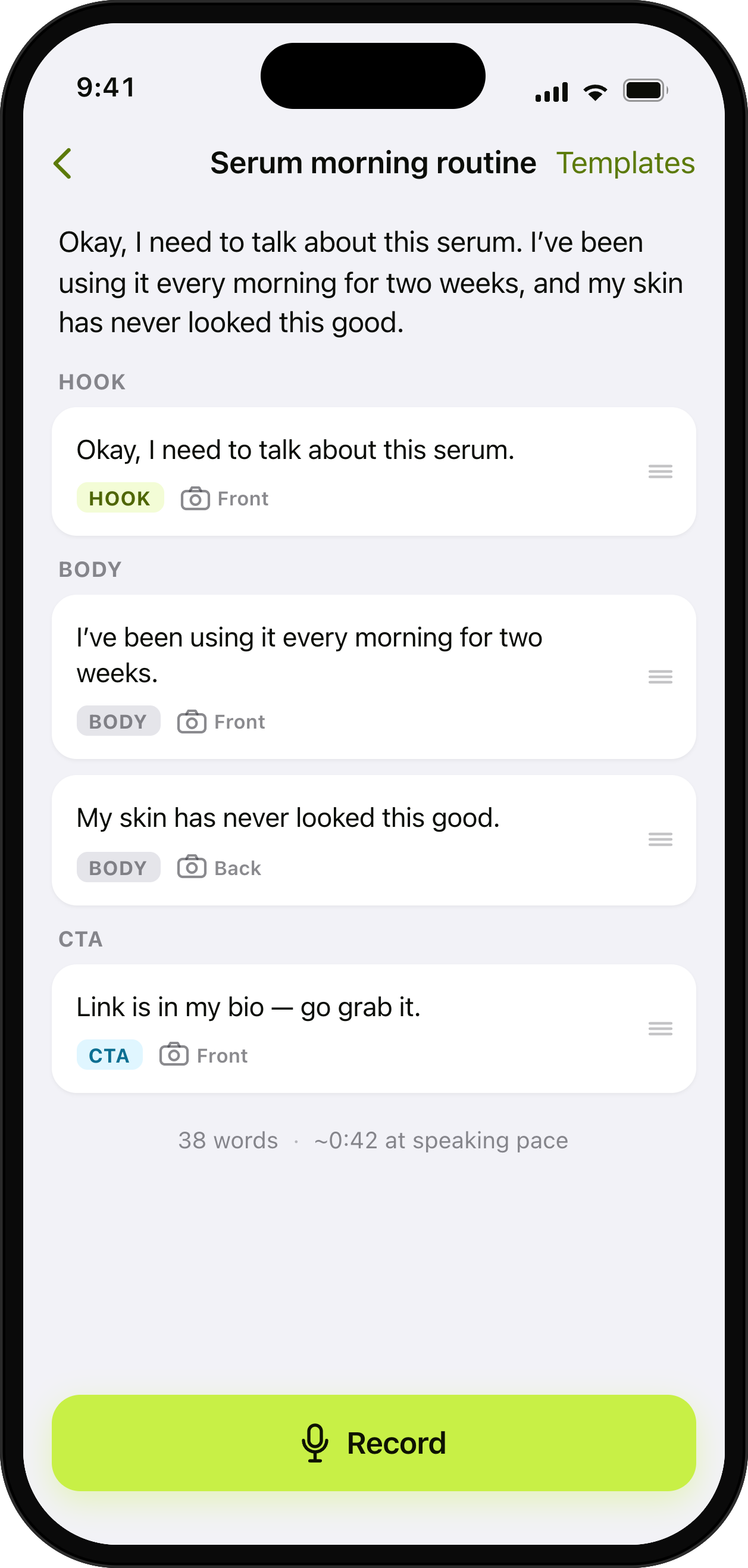
A script-first editor treats the text as the source of truth. In UGCut you write or paste the script, the app splits it into sentences, and you tag each one Hook, Body, or CTA. Then you read it once with the teleprompter. Because the app knows the text and knows where each sentence began and ended in the take, it can cut the take into one clip per sentence with no scrubbing and no manual trim points. Every cut is anchored to a sentence in your script.
The result is that editing becomes editing text. Cutting a sentence removes a clip. Reordering sentences reorders the video. Re-recording sentence seven replaces clip seven and leaves everything else alone. You are still making all the editorial decisions, you are just making them about units you can hold in your head instead of about frames.
This is a trade, not a free win. Timeline editors are more powerful and always will be. If your video needs layered B-roll, keyframed motion, or a multi-camera assembly, a timeline is the correct tool and UGCut is not trying to replace it. What UGCut is claiming is narrower: for a single-speaker scripted video, the timeline is a detour, and the fastest path from a script to a captioned portrait file does not go through one.
- Timeline-first: import footage, find cut points by watching, trim by hand, add captions, export.
- Script-first: write sentences, read them once, get clips per sentence, pick takes, caption, export.
- Same decisions, different unit. Sentences instead of frames.
The full loop, end to end
Five steps, in order, all on the phone. Each one has its own page if you want the detail.
- 1
Write the script
Write or paste it, and UGCut splits it into sentences you can tag Hook, Body, and CTA. One idea per sentence, because one sentence becomes one clip. Start blank or from a template.
More on write the script - 2
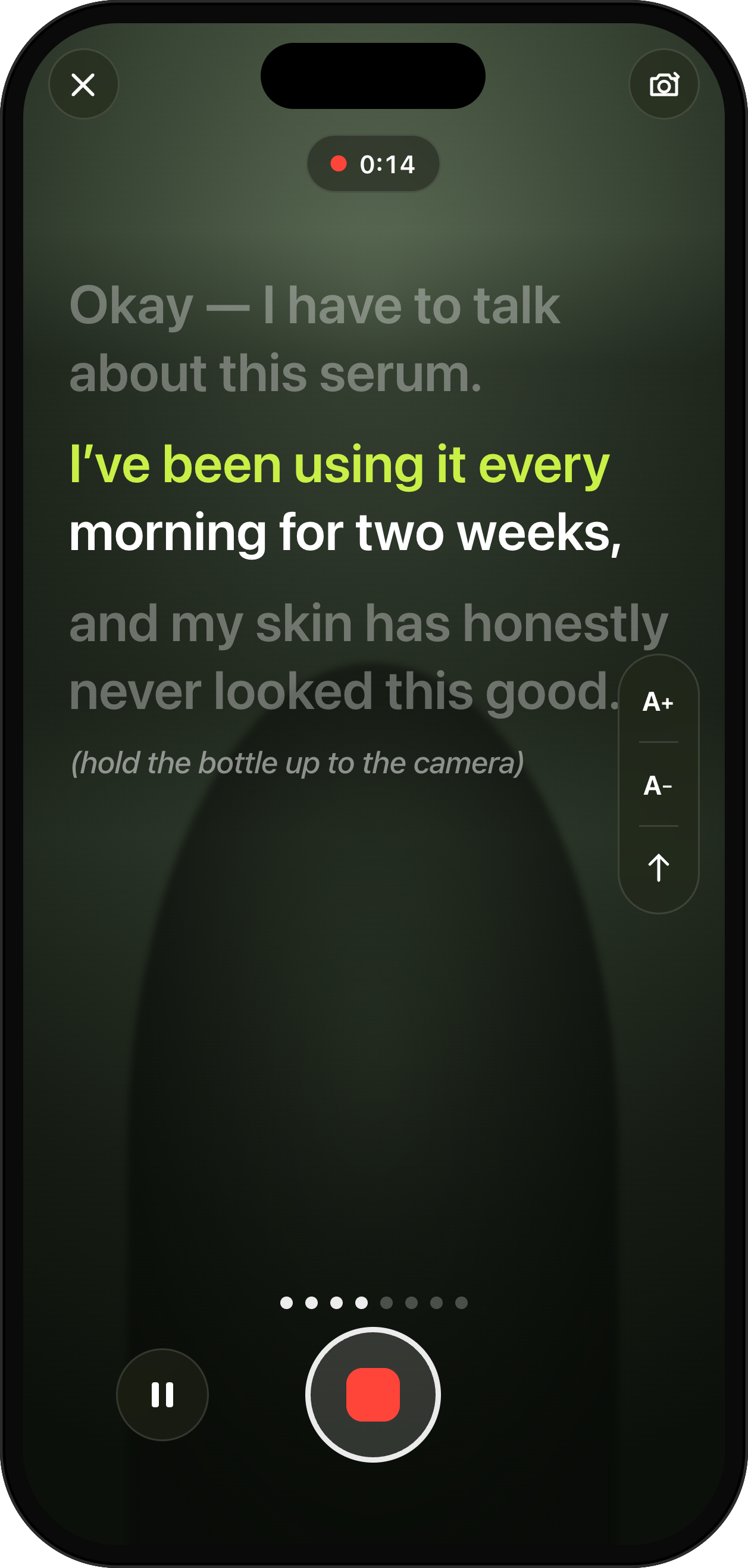
Read it with the teleprompter
The prompter follows your voice rather than scrolling at a fixed speed, so you set the pace. The current sentence is highlighted and its neighbours dim. Flub a line and one gesture re-records just that sentence.
More on read it with the teleprompter - 3
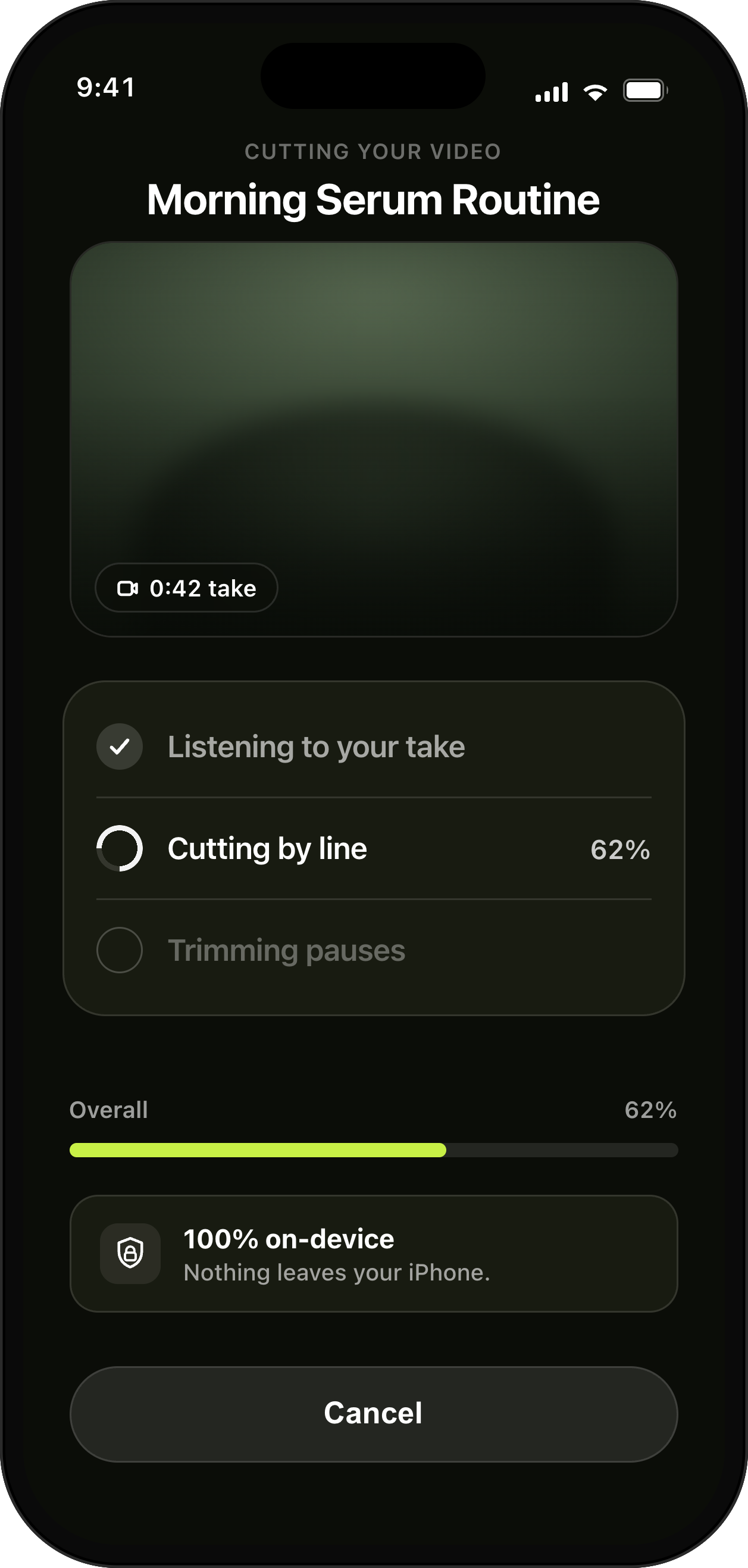
Get the cut automatically
The moment you stop, UGCut cuts the take into one clip per sentence, anchored to your script. No scrubbing, no trim handles, no timeline. The rough cut exists before you make a single editing decision.
More on get the cut automatically - 4
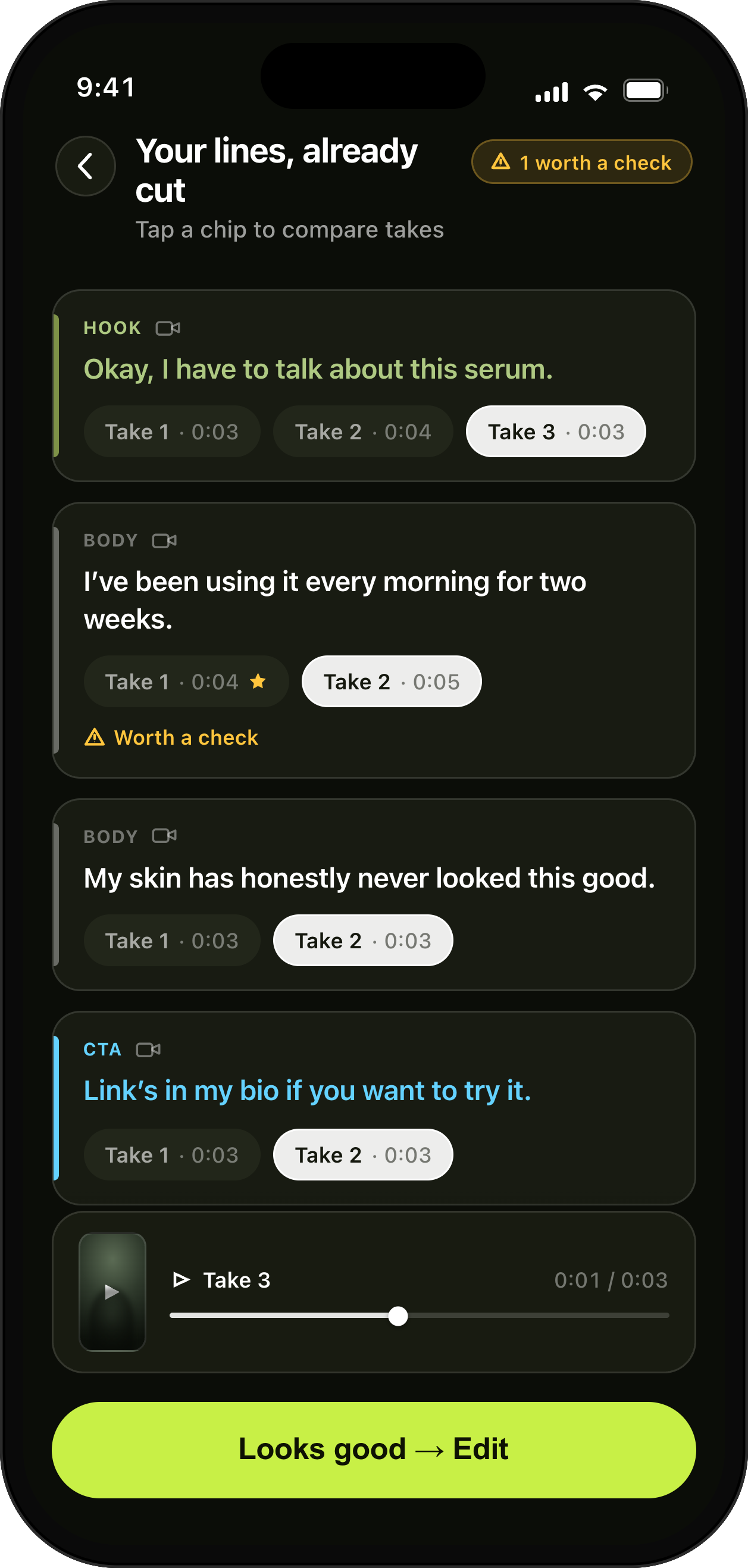
Choose your takes
Every sentence keeps its own takes, filed under the line they belong to. Play them back to back, pick the best read for each line, or re-record one sentence without touching the rest of the video.
More on choose your takes - 5
Caption and export
On-device speech recognition burns in animated captions with a word-by-word active highlight in your chosen style, then you export a portrait file sized for TikTok, Reels, or Shorts with a safe-zone preview.
More on caption and export
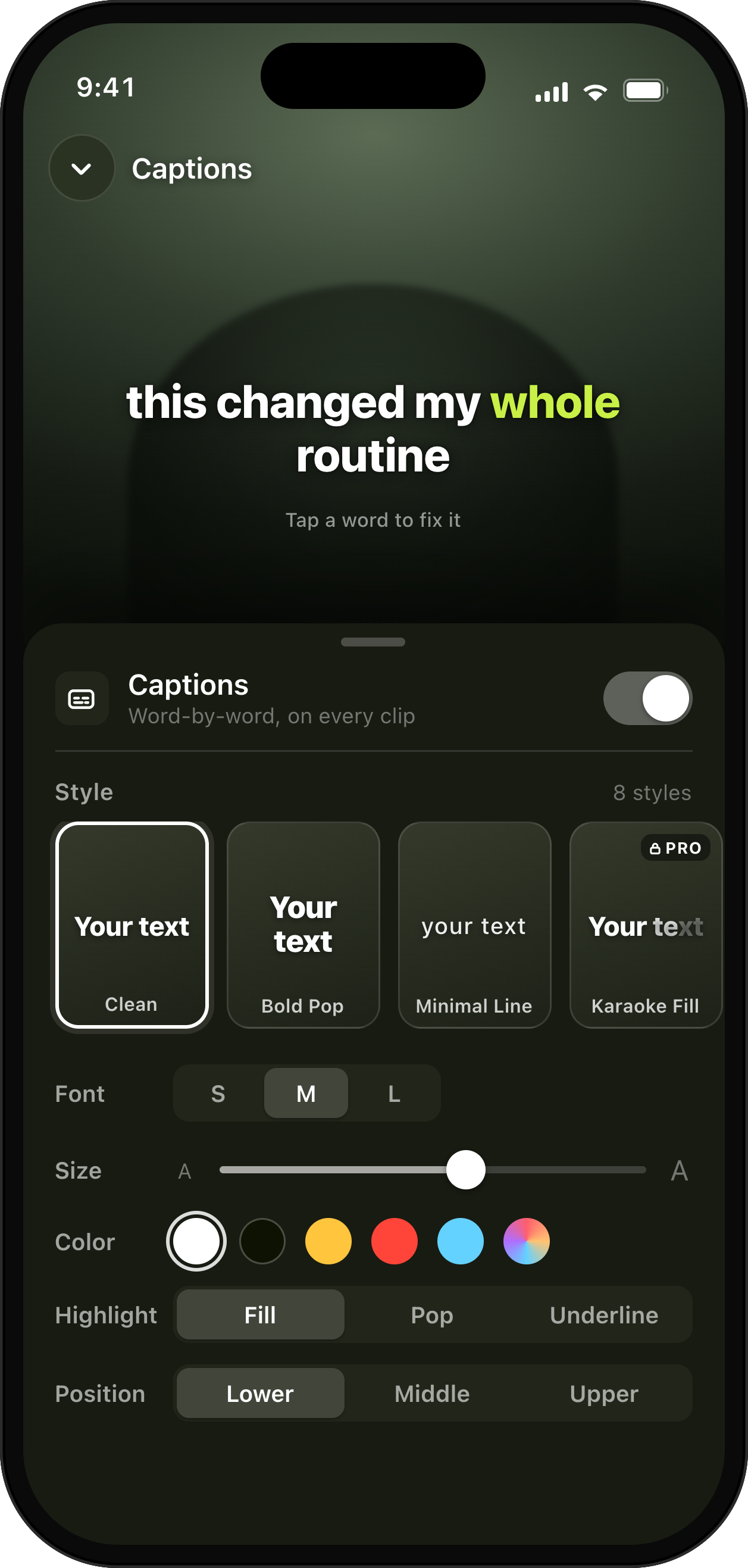
Step five ends at export. Platform export presets covers TikTok, Reels, and Shorts sizing and the safe-zone preview.
Editing on your iPhone
All the AI in the core loop runs on-device on iOS 26 and later. The script, the footage, the cutting, the speech recognition behind the captions, and the export all happen on your phone. Editing needs no media upload. Media leaves your iPhone only when you choose to send it for an online feature. Those features are planned and are not available yet.
No account is required to write, record, cut, caption, and export. Limited anonymous completed-purchase history goes to RevenueCat for subscription functionality and analytics. It is not linked to your identity or used for tracking, and it never includes creator content.
For brand work this has stopped being a nice-to-have. Briefs increasingly say something about where footage may be processed, particularly when the product in the video is not announced yet. Local editing keeps that footage on your iPhone. You decide whether to send it for an online feature.
Who this is for, and who it is not for
It is for people shipping talking-head video on a schedule. Creators making three to ten brand deliverables a week from briefs, daily posters who need idea to posted in one sitting, and small-business owners who want to look professional without learning an editor.
It is not for you if your videos are montages, if you cut to music rather than to speech, if you work primarily on a laptop, or if a client requires project files in a specific desktop format. Those are real requirements and a script-first phone app does not meet them.
It is also worth being clear about what free editors already do. There are capable free desktop editors with no watermark. UGCut is not betting that it is cheaper. It is betting on the part a general-purpose editor cannot copy without changing what it is: the script is the file, and the video assembles itself around it.
What is free and what is Pro
The whole core loop is free. Script editor, teleprompter, auto-cut, takes review, captions, and export are never gated. Free includes 3 of the 8 caption styles and exports up to 1080p with a small UGCut watermark, shown clearly before you export.
Pro removes the watermark, adds 4K in supported formats and all 8 caption styles. Marketplace applications, the full course and direct publishing will require Pro when they launch. Plan details are on the pricing page.
See what is planned for pricing. Apple confirms the final local price and any offer before you buy.
Every feature, in one place
Video Script Editor with Auto-Segmentation
Write or paste a script and UGCut splits it into sentences you can tag Hook, Body, and CTA. Start from a template or a blank page.
Teleprompter App for iPhone
The prompter follows your voice and scrolls at your pace. Flub a line and one gesture re-records just that sentence.
Auto-Cut Video, One Cut Per Sentence
UGCut cuts your take into clips per sentence automatically, anchored to your script, with no scrubbing and no manual trim points.
Takes Review & Re-Record
Every sentence keeps its takes. Review by script line, pick the best, or re-record a single sentence without touching the rest.
Auto Captions for iPhone Video, 8 Styles
On-device speech recognition burns in animated captions with a word-by-word active highlight. Choose from 8 styles.
Export Presets for TikTok, Reels and Shorts
Export portrait-first presets for TikTok, Reels, and Shorts with a safe-zone preview, up to 1080p free and 4K on Pro.
Voice clean-up and audio levelling for iPhone video
Choose Studio, Natural, or Original for project-level voice treatment, then level the final mix on device.
Questions people ask before they pick an editor
- What is a UGC video editor?
- A video editor built for the specific job of user-generated content: a single speaker reading a short script to a phone camera, cut tight, captioned, and exported portrait for TikTok, Reels, and Shorts. It is a narrower job than general video editing, which is why a general-purpose timeline editor makes it slower than it needs to be.
- What does script-first mean?
- You write or paste a script and the app splits it into sentences. You read it with a teleprompter, and every downstream piece (clips, takes, cut points, captions, retakes) is tied to a sentence in that script. Flubbed sentence 7? Re-record just sentence 7. Need a different hook? Swap that one line.
- Do I still get to control the edit?
- Yes. You choose which take of each sentence is used, you can drop a sentence, and you can reorder sentences. The difference is the unit: you are editing sentences rather than frames, and the cut rebuilds around your choices.
- Is this a replacement for a timeline editor?
- Not for every video. If you need layered B-roll, keyframed motion, or a multi-camera assembly, a timeline editor is the right tool. UGCut is aimed at single-speaker scripted video, where the timeline is a detour rather than a feature.
- Does my footage leave my phone?
- Editing happens on your iPhone. Media leaves it only when you choose to send it for an online feature. Those features are not available yet. You can use the core editor without an account.
- How long does one video take?
- Completion time is not measured yet. UGCut cuts a take by sentence, so you can review the edit without finding each cut by hand.
- Can I use it on Android or a desktop?
- UGCut is an iPhone app and requires iOS 26 or later for the on-device AI in the core loop. There is no Android or desktop version.
- Can I try it now?
- Not yet. UGCut is pre-launch and is not on the App Store. You can join the waitlist to be notified when it is ready.
Further reading
- How to make UGC videos on your phone
The whole workflow, brief to delivered file, without a laptop.
- A short-form video script template
The hook, body, and CTA shape, with examples you can copy.
- How to use a teleprompter on iPhone
Eyeline, distance, and lighting, so the read does not sound read.
- Auto-cutting video by sentence
What sentence-anchored cutting replaces, and what it does not.
UGCut is not out yet
The app is pre-launch and is not on the App Store. Leave your email and you will hear from us when it is ready, and not for anything else.
Coming soon, get notified