Export Presets for TikTok, Reels and Shorts
Export portrait-first presets for TikTok, Reels, and Shorts with a safe-zone preview, up to 1080p free and 4K on Pro.
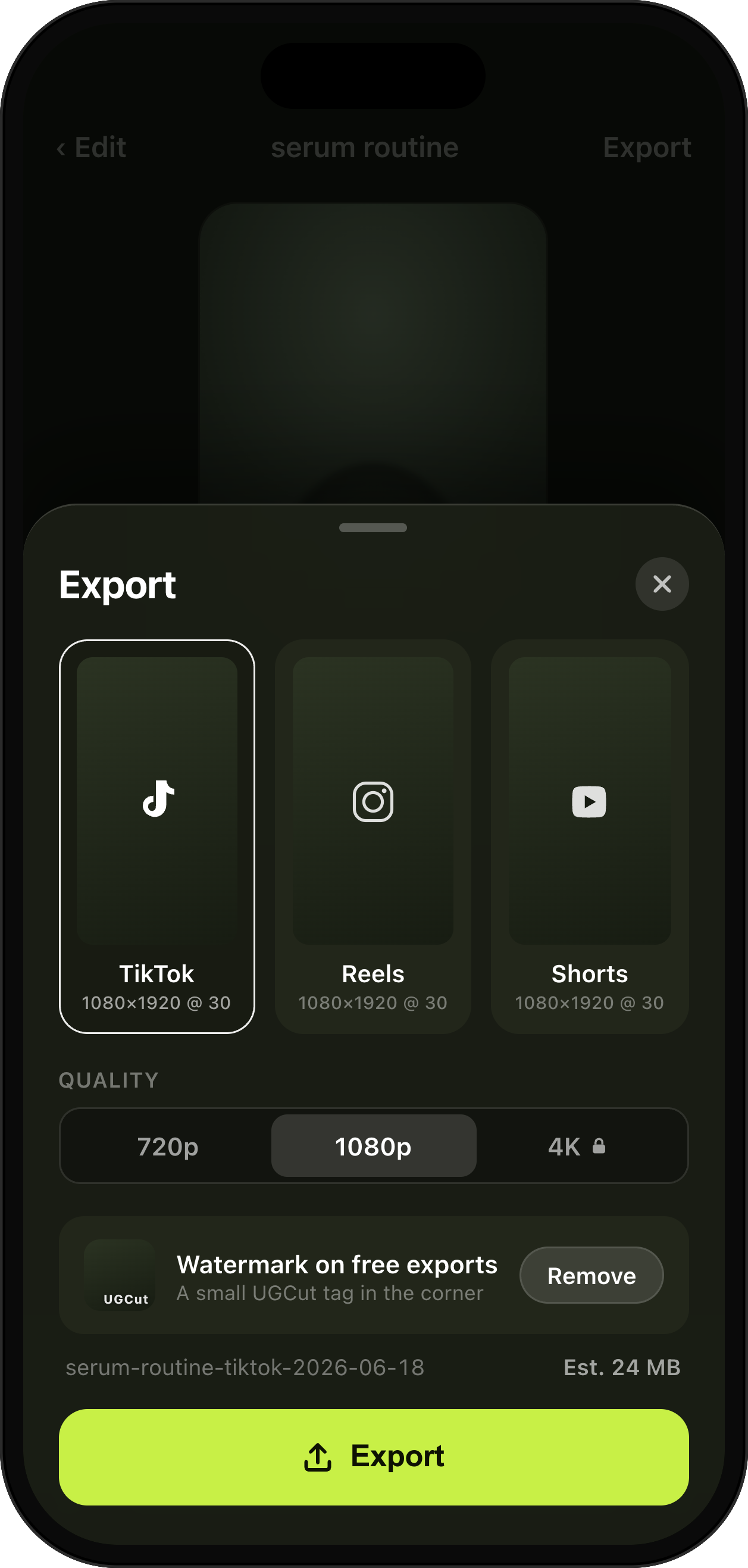
TikTok, Reels & Shorts presets, safe-zone aware.
How it helps
Send platform-ready files in seconds, with captions and key moments clear of each app’s on-screen UI.
- TikTok / Reels / Shorts
- Safe-zone preview
- Up to 4K (Pro)
Learn more about UGCut on the app overview.
UGCut exports portrait-first presets for TikTok, Reels, and Shorts, with a safe-zone preview so your captions and key moments are not sitting under a platform button. Free exports up to 1080p; Pro unlocks 4K and removes the watermark.
Same frame, three different sets of buttons
All three platforms want a 9:16 portrait video, which sounds like one export until you look at what each app draws on top of it. Usernames, captions, sound credits, follow buttons, and a stack of icons down the right side all live inside the frame, and each platform puts them in a slightly different place.
That is why a video can look perfect in your camera roll and broken in the feed, with your CTA text half hidden behind a share icon. The fix is not guesswork, it is knowing where the interface sits before you export.
What a safe-zone preview actually tells you
The safe-zone preview shows you the region of the frame that stays clear of each platform’s on-screen interface. Anything you care about, your face, your captions, an on-screen price, belongs inside it.
Two habits follow from that. Frame yourself slightly high, because the bottom of a short-form frame is the busiest area on every platform. And keep captions out of the lower third by default, which is the opposite of what film subtitling taught everyone.
Check the preview before you send a file to a client, not after. Feedback that says "the code is hidden on my phone" costs a re-export and a day.
- Face and captions inside the safe zone on every platform you are posting to.
- Frame high. The bottom of the frame belongs to the platform.
- Any on-screen text, codes, or prices go in the middle band.
- Preview once per deliverable, before delivery.
Resolution, watermark, and what free actually gives you
The free tier keeps the entire core loop: script, teleprompter, auto-cut, takes, captions, and export. It exports up to 1080p and includes a small UGCut watermark, which is shown clearly before you export so it is never a surprise at delivery. Pro removes the watermark, unlocks 4K, and adds all 8 caption styles.
1080p is genuinely enough for a feed post. It is not always enough for a client who has asked for masters, or for footage that may be re-cropped later, which is where 4K earns its place. Decide by deliverable rather than by default, since the larger file takes longer to move around.
Details on plans and what they include are on the pricing page.
Delivering to a client versus posting yourself
Posting yourself, export once and upload. Delivering to a client, it is worth agreeing two things in advance: whether they want captions burned in (they usually do, but some brands caption in-house to their own style guide), and whether they want a version without your intro or with their exact CTA wording.
Name files so a human can sort them. Brand, deliverable, hook variant, date. It sounds pedantic until a client comes back three weeks later asking for "the second one".
Because everything is exported from your phone with no upload step, delivery speed is bounded by your own connection to wherever you are sending files, not by a rendering queue you are sharing with strangers.
One video, three platforms, without three edits
The usual reason a creator ends up re-editing the same video three times is that each platform got a different crop and a different caption position, and by the third pass nobody remembers which version had the corrected CTA. It is a filing problem dressed up as an editing problem.
Because the video is assembled from your script rather than from a timeline, the version that goes to all three is the same version. What changes is the export preset. You are not rebuilding an edit for TikTok and then rebuilding it again for Shorts, you are exporting the same sentence-anchored cut against a different set of on-screen furniture.
That also means a late fix lands everywhere. Re-record the sentence with the wrong discount code, and every export you make from then on has the corrected line, because there is one source of truth and it is the script.
A short checklist before you hit export
Most export mistakes are cheap to catch and expensive to catch late. Run through this once and you will avoid nearly all of them.
- Watch the first two seconds on mute. If the hook does not hold there, fix the hook, not the export.
- Check the safe-zone preview for the platform you are actually posting to.
- Read the caption on the line with the brand name, the handle, and any number.
- Confirm the CTA wording matches the brief exactly, if there is a brief.
- Pick the resolution for the deliverable rather than by habit.
Common questions
- Which platforms does UGCut export for?
- UGCut exports portrait-first presets sized for TikTok, Reels, and Shorts, with a safe-zone preview so captions and key moments clear each platform’s on-screen interface.
- What resolution can I export at?
- Free exports up to 1080p. Pro unlocks 4K export, removes the watermark, and adds all 8 caption styles.
- Is there a watermark on the free tier?
- Yes, the free tier includes the full creator loop with a small UGCut watermark, and it is shown clearly before export. Pro removes it.
- Does exporting require an internet connection?
- The export runs on your iPhone. There is no upload of your footage and no rendering queue on a server.
Where this sits in the loop
UGCut is a script-first video editor for UGC creators, and this feature is one step of a five-step loop: script, record, auto-cut, takes, caption and export.
Auto Captions, 8 Styles
The captions you are checking against the safe zone.
Takes Review & Re-Record
Fix a line before export rather than after delivery.
Auto-Cut Per Sentence
What produced the cut you are about to export.
Voice Clean-Up & Audio Levelling
Level the mix before you send the platform-ready file.
Further reading
- How to make UGC videos on your phone
Brief to delivered file, without a laptop.
- A short-form video script template
Write CTAs that survive being placed inside the safe zone.
UGCut is not out yet
The app is in development and is not on the App Store yet. Join the waitlist.
Join the waitlist