Teleprompter App for iPhone
The prompter follows your voice and scrolls at your pace. Flub a line and one gesture re-records just that sentence.
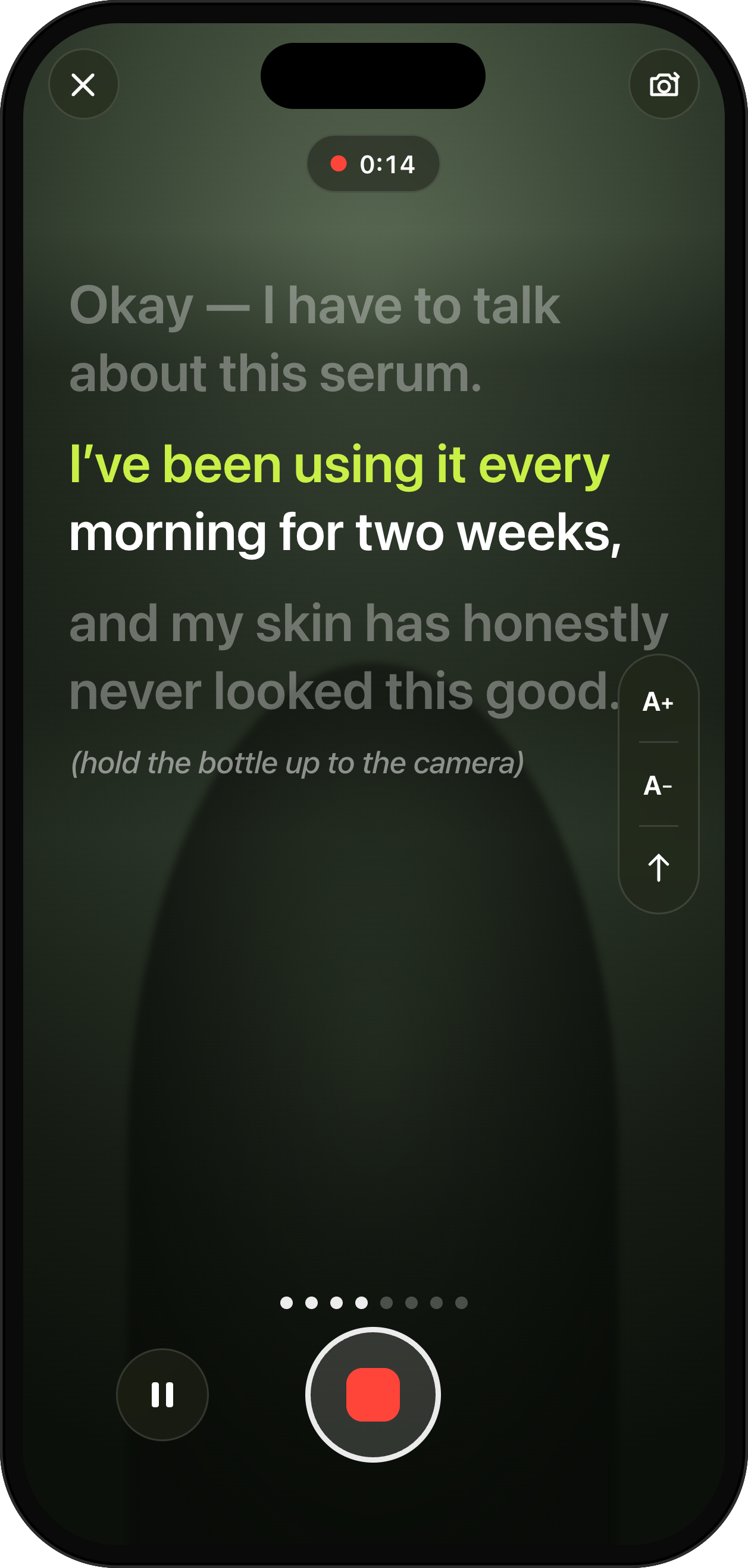
Read it to the camera. The prompter follows your voice.
How it helps
Read naturally without racing a fixed scroll, and never re-film a whole take for one bad line.
- Follows your voice
- One-gesture retake
- Adjustable text size
Learn more about UGCut on the app overview.
Most iPhone teleprompters scroll at a speed you set in advance, which means you spend the take chasing the text or waiting for it. UGCut’s prompter follows your voice instead. It highlights the sentence you are on, dims the neighbours so you can see what is coming, and moves when you move. If you flub a line, one gesture re-records that sentence rather than the whole take.
Fixed-speed scrolling is why teleprompter takes sound wrong
A fixed scroll makes you the follower. You slow down to let the words catch up, or you rush a clause because the line is about to leave the screen, and either way your delivery bends around the machine. Viewers cannot name it, but they hear it. It is the flat, slightly hurried read that says "this person is reading".
Speech following removes the negotiation. You read at whatever pace the sentence deserves, pause where you would naturally pause, and the script keeps up. Because the highlight sits on the line you are speaking, your eyes stay in one place instead of tracking a moving block of text, which is what keeps your gaze near the lens.
Getting your eyeline right on an iPhone
The oldest teleprompter problem is that the words are not where the camera is. On a phone the front camera sits at the top of the screen and the text sits in the middle, so a reader looks slightly low. A few things fix most of it.
Push the phone further away. At arm’s length the angle between the text and the lens shrinks, and the difference between looking at the words and looking at the camera stops being visible. Increase the text size so it stays readable at that distance, which the prompter lets you do.
Keep the prompter text near the top of the frame where possible, and glance to the lens on the last words of each sentence. Because you know where the sentence ends, you can plan that glance. That is a trick fixed-speed prompters make hard and a sentence-aware prompter makes easy.
- Phone at arm’s length or on a stand, not in your palm at reading distance.
- Text size up, so distance does not cost you legibility.
- Lens at eye height. Looking down at a propped phone reads as low energy.
- Look to the lens for the last few words of each line, then back.
One gesture, one sentence, one retake
The reason most people hate teleprompters is the restart. You are eight sentences deep, you fumble the brand name, and the honest options are to keep going and fix it in the edit or to go back to the top. Both cost you.
Because the prompter knows which sentence you are on, a retake can be scoped to that sentence. One gesture re-records the line you just ruined. The takes you already nailed stay where they are, and the video keeps its structure. Across a shoot of five deliverables that is the difference between an afternoon and a coffee break.
It also changes how you perform. When a fumble costs four seconds instead of four minutes, you stop protecting the take and start trying things. The second read of a hook is usually better than the first, and the third is usually the one you use.
Recording conditions that actually matter
Speech following listens to you, so give it something clean to listen to. A quiet room beats an expensive microphone in a noisy one. Turn off anything with a fan, close the window facing the street, and get the phone within a metre or so if you are using its own mic.
Light your face from the front, ideally from a window you are facing rather than one behind you. Backlight makes the camera expose for the window, and a dark face is a scroll-past. This is unglamorous advice and it is still the single biggest quality jump available to most creators.
Do one warm-up read of the hook before you record. Not for practice exactly, but because the first sentence out of your mouth in any session is always the stiffest one.
Common questions
- How is a speech-following teleprompter different from a normal one?
- A normal teleprompter scrolls at a fixed speed you set before the take, so you have to match its pace. UGCut’s prompter follows your voice, highlights the sentence you are currently speaking, and dims the neighbouring lines so you can anticipate what is next.
- What happens if I fluff one line?
- A single gesture re-records just that sentence. You do not restart the take, and the sentences you already recorded keep their takes.
- Can I change the text size?
- Yes, the prompter text size is adjustable. Larger text lets you hold the phone further from your face, which shrinks the gap between where you are reading and where the lens is.
- Does the teleprompter need an internet connection?
- The core loop runs on-device on iOS 26 and later, including the speech processing. Media leaves your iPhone only when you choose to send it for an online feature.
Where this sits in the loop
UGCut is a script-first video editor for UGC creators, and this feature is one step of a five-step loop: script, record, auto-cut, takes, caption and export.
Further reading
- How to choose a teleprompter app for iPhone
A practical check of eyeline, voice following, retakes, and watermarks.
- How to use a teleprompter on iPhone
Eyeline, distance, lighting, and the read itself, step by step.
- How to make UGC videos on your phone
Where the prompter sits in the wider workflow.
UGCut is not out yet
The app is in development and is not on the App Store yet. Join the waitlist.
Join the waitlist