Video Script Editor with Auto-Segmentation
Write or paste a script and UGCut splits it into sentences you can tag Hook, Body, and CTA. Start from a template or a blank page.
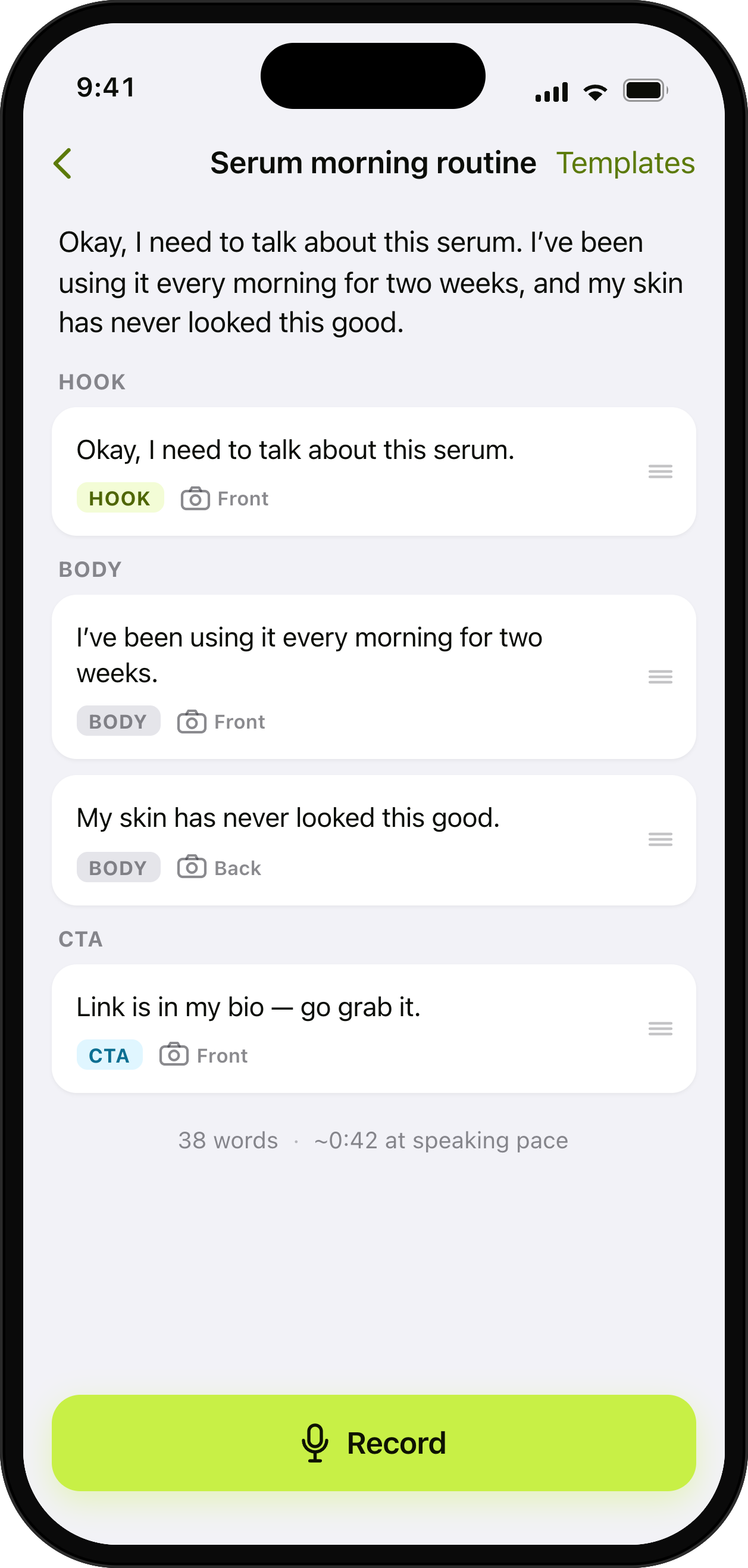
Write it once. Tag Hook, Body, CTA.
How it helps
Turn a brand brief into a structured, shoot-ready script in minutes, then reuse the structure for hook variants.
- Auto sentence segmentation
- Hook / Body / CTA tags
- Starter templates
Learn more about UGCut on the app overview.
A UGC script is not a screenplay. It is a hook, a short middle, and an ask, written the way you actually talk. UGCut gives you a place to write that, splits what you wrote into sentences, and lets you tag each one Hook, Body, or CTA. Those sentences are not decoration. They become the recording units, the cut points, and the retake units for everything that happens after.
Why the script is the file, not the footage
In a normal mobile editor the file is a pile of clips. You shoot first, then you go looking for the good parts. That search is the expensive bit, and it is the reason a 30 second talking head can eat an evening.
UGCut inverts it. You write the sentences first, so by the time you press record the structure of the video already exists. The app knows there are nine sentences, it knows sentence one is the hook and sentence nine is the CTA, and it knows which words belong to which. When you stop recording, it has everything it needs to cut without asking you to scrub.
The practical effect is that editing turns into editing text. Change a sentence and you have changed a clip. Delete a sentence and you have deleted a cut. That is the whole wedge, and it starts here in the script editor.
Hook, Body, CTA, and why tagging them matters
Every short-form video that works is doing three jobs in order: earn the next two seconds, deliver the thing, ask for the action. Tagging your sentences forces you to be honest about which job each line is doing. If you tag four sentences Hook, you do not have a hook, you have an intro.
The tags also make variants cheap. Briefs from brands routinely ask for three hook options on the same body. Because the hook is one tagged sentence rather than the first eleven seconds of a video file, you swap that one line and re-record that one line. The body and the CTA are untouched.
- Hook: one sentence, ideally under three seconds spoken. State the problem or the promise.
- Body: two to six sentences. One idea per sentence, because one sentence becomes one clip.
- CTA: one sentence. Say the actual action, not "check the link".
Writing sentences that survive being read out loud
The editor rewards short sentences, and not for stylistic reasons. A long sentence is a long clip, and a long clip is a clip you cannot trim without a timeline. If you write "I tried this for a week and honestly the thing that surprised me was how much time it saved on the boring part which is the editing", you have created one unbreakable 12 second block. Split it into three and you can cut any one of them.
Read your draft out loud before you record it. Anything you stumble over twice is a sentence to rewrite, not a sentence to practice. You will hear filler words that look fine on screen and sound terrible in a take.
Numbers, names, and product terms deserve their own short sentence. Speech recognition is most accurate when a proper noun is not buried mid-clause, and captions are easier to fix later when the risky word sits in a short line.
Starting from a template or from a brief
You can start blank or from a starter template. Templates are useful the same way a shot list is useful: they stop you staring at an empty screen and they keep the shape of the video consistent across a week of posts.
Working from a client brief, paste the brief into a note first and pull out three things: the one claim they want made, the one thing they will not let you say, and the CTA wording they need verbatim. Then write the script around those. The CTA sentence is usually the one that must match the brief word for word, which is another reason it is worth having as its own tagged sentence.
What the script editor is not
It does not write the script for you, and it does not judge your hook. It is a writing surface that produces a structure the rest of the app can act on. If you want help with the writing itself, the short-form script template on our blog is a better starting point than a blank page.
Writing and editing need no account and run on your iPhone. If you turn on project sharing, UGCut sends plans and status for all projects in your account, including script text, so authorized clients can read them. Portfolio video uploads are a separate choice.
Common questions
- Can I paste a script I wrote somewhere else?
- Yes. Write or paste your script and UGCut splits it into sentences you can tag Hook, Body, and CTA. Pasted text is treated exactly like text you typed in the app.
- How long should a UGC script be?
- For a 30 second talking-head video, six to nine short sentences is a normal range once you read them at a natural pace. Because every sentence becomes its own clip, it is better to write more short sentences than fewer long ones.
- Does the script get uploaded anywhere?
- No. All AI in the core loop runs on-device on iOS 26 and later. Your script, footage, cuts, and captions are processed on your iPhone, and no account is required to write, record, cut, caption, and export.
Where this sits in the loop
UGCut is a script-first video editor for UGC creators, and this feature is one step of a five-step loop: script, record, auto-cut, takes, caption and export.
Further reading
- A short-form video script template
The hook, body, and CTA shape, with examples you can copy.
- How to make UGC videos on your phone
The full loop, from brief to posted, without a laptop.
UGCut is not out yet
The app is in development and is not on the App Store yet. Join the waitlist.
Join the waitlist