Auto Captions for iPhone Video, 8 Styles
On-device speech recognition burns in animated captions with a word-by-word active highlight. Choose from 8 styles.
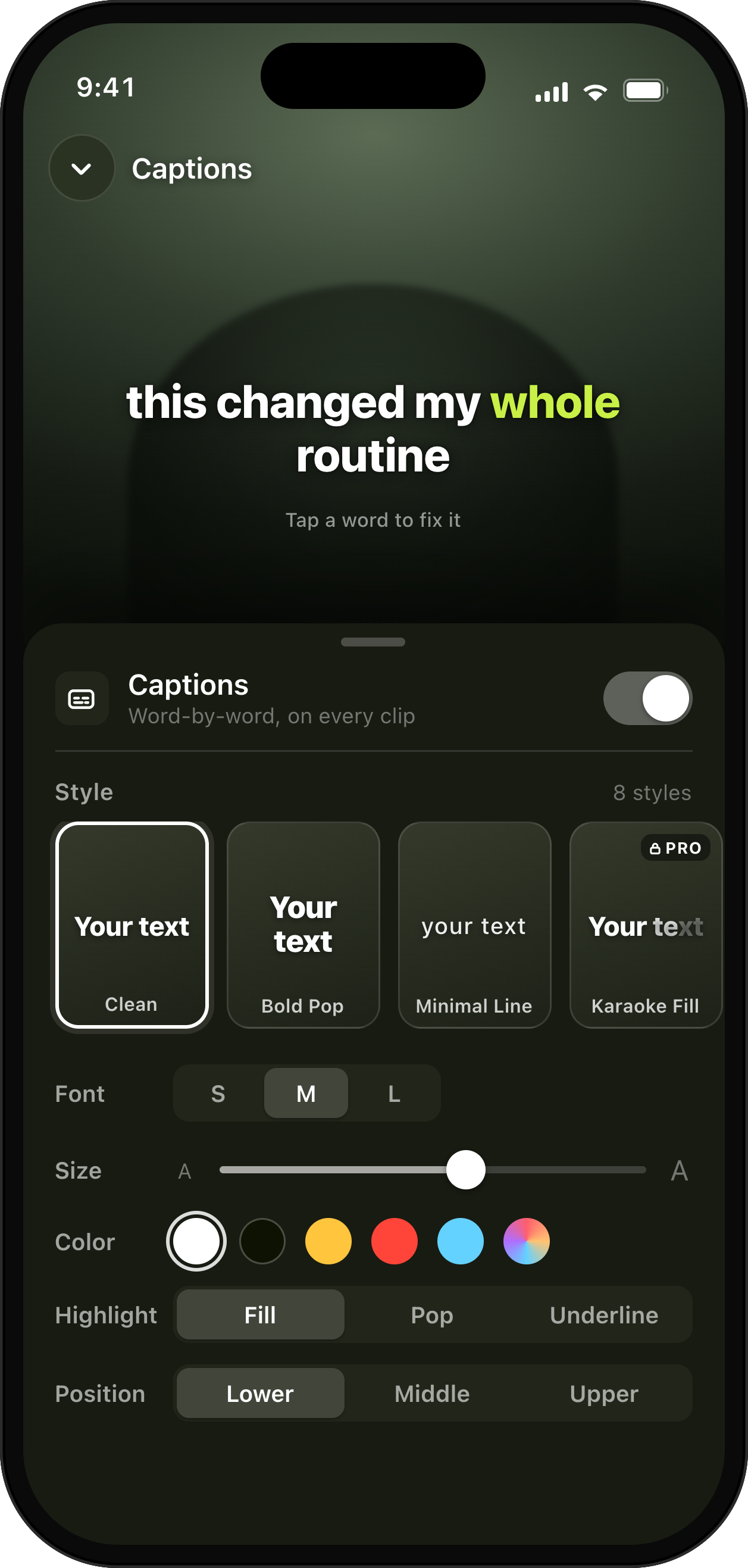
Word-by-word captions, in your style.
How it helps
Ship captioned videos that hold attention, the captions creators pay other apps to add.
- On-device captions
- Active-word highlight
- 8 caption styles
Learn more about UGCut on the app overview.
UGCut burns in animated captions using on-device speech recognition, with a word-by-word active highlight and a choice of 8 styles. Captions are generated from the same take the cut is built from, on your iPhone, with no upload and no separate captioning app in the middle of your workflow.
Why burned-in captions still beat platform captions
Every platform offers some form of automatic captioning now, and they are fine. They are also inconsistent between apps, they sit wherever the platform decides, and they can be switched off by the viewer. A burned-in caption is part of the picture, so it looks the same on TikTok, Reels, and Shorts, and it is there for the large share of people watching with the sound off.
Styling is the other half. Platform captions look like platform captions. A caption style you chose is part of your look, and consistency across a month of posts is one of the few things a small account can control.
The word that always gets mangled
Automatic captioning is good at ordinary sentences and bad at exactly the words you care about most: brand names, product names, handles, and prices. A 95 percent accurate transcript sounds excellent until the 5 percent lands on the client’s name, in the deliverable, on the hook.
There is no magic fix for this, in any app, so the useful move is to make the risky words easy to say and easy to catch. Say a brand name in its own short sentence, slightly slower than the rest. Then check that one sentence first when you review the captions, rather than reading the whole thing top to bottom and losing attention by line four.
Because captions here are tied to sentences, checking is quick: you are looking at a specific line, not hunting through a transcript.
- Give brand names, handles, and numbers their own short sentence.
- Say them a touch slower than the surrounding lines.
- Check those lines first when reviewing captions.
- Keep the CTA wording simple, since it is the line a client will read most closely.
Active-word highlighting, and why it holds attention
A static block of caption text gives a viewer nothing to track. A word-by-word active highlight moves in time with your voice, which does two things: it keeps the eye anchored to the current word, and it gives the frame a small, constant motion cue that costs nothing in production.
It also helps comprehension when the audio is competing with a noisy environment, which is where most short-form is actually watched. The highlight tells you which word you are hearing, so a half-heard sentence still lands.
Use it, but do not fight it. Caption text that is too long per line forces the eye to sweep instead of track, which undoes the benefit. Short sentences produce short caption lines, which is one more reason the script editor pushes you towards them.
Eight styles, three free, and how to choose one
There are 8 caption styles. Free includes 3 of them along with the whole core loop; Pro adds the other 5 alongside removing the watermark and unlocking 4K. Pricing detail lives on the pricing page rather than here.
Choosing is mostly about contrast and weight. Heavier styles survive busy backgrounds and small screens; lighter ones look better over calm, evenly lit footage. Whatever you pick, pick one and keep it for a month. A recognisable caption look does more for a small account than a different style every post.
Keep captions clear of the platform interface. That is what the safe-zone preview in export is for, and it is worth checking before you send a file to a client rather than after.
On device, including the speech recognition
The speech recognition that produces the captions runs on your iPhone using on-device AI on iOS 26 and later. Your audio is not sent anywhere to be transcribed, which is unusual for automatic captioning and is the reason the feature works with no signal.
For brand work under embargo, that removes an awkward conversation about which third party heard the unreleased product name.
Common questions
- Are the captions generated on my phone or in the cloud?
- On your phone. UGCut recognizes speech locally on iOS 26 and later to create captions. If you separately choose to upload a portfolio video, that upload includes any sound in the video.
- How many caption styles are there?
- There are 8 styles with a word-by-word active highlight. The free tier includes 3 of them plus the entire core loop; Pro adds all 8, removes the watermark, and unlocks 4K export.
- Will the captions get my brand name right?
- No automatic captioning is perfect on proper nouns. Give brand names, handles, and numbers their own short sentence and say them slightly slower, then check those lines first. Because captions are tied to sentences, checking one line is quick.
- Are the captions burned into the video?
- Yes. Captions are burned in, so they look identical on TikTok, Reels, and Shorts and cannot be switched off by the viewer.
Where this sits in the loop
UGCut is a script-first video editor for UGC creators, and this feature is one step of a five-step loop: script, record, auto-cut, takes, caption and export.
Auto-Cut Per Sentence
Captions and cuts share the same sentence boundaries.
Platform Export Presets
Check captions against the safe zone before you export.
Script Editor with Auto-Segmentation
Short sentences produce short, readable caption lines.
Voice Clean-Up & Audio Levelling
Clean up the voice before you check the words.
Further reading
- Why auto captions get words wrong
The names, handles, and numbers to check before export.
- How to add captions on iPhone
A short workflow for readable captions without another upload.
- Auto-cutting video by sentence
The sentence unit that captions ride on.
- How to make UGC videos on your phone
Where captioning sits in a same-day workflow.
- How to fix bad audio in a video on iPhone
Fix the recording before you review the caption words.
UGCut is not out yet
The app is in development and is not on the App Store yet. Join the waitlist.
Join the waitlist