UGCut
Video editor features for UGC creators
UGCut is an iPhone video editor for UGC creators that connects creator-written scenes, recording, take selection, editable captions and export in one flow.
These seven cover the creator workflow: write the script, read it with the teleprompter, cut and review takes, caption, choose a voice treatment, and export. If you are still working out whether a script-first video editor for UGC creators fits the way you make videos, start there.
Video Script Editor with Auto-Segmentation
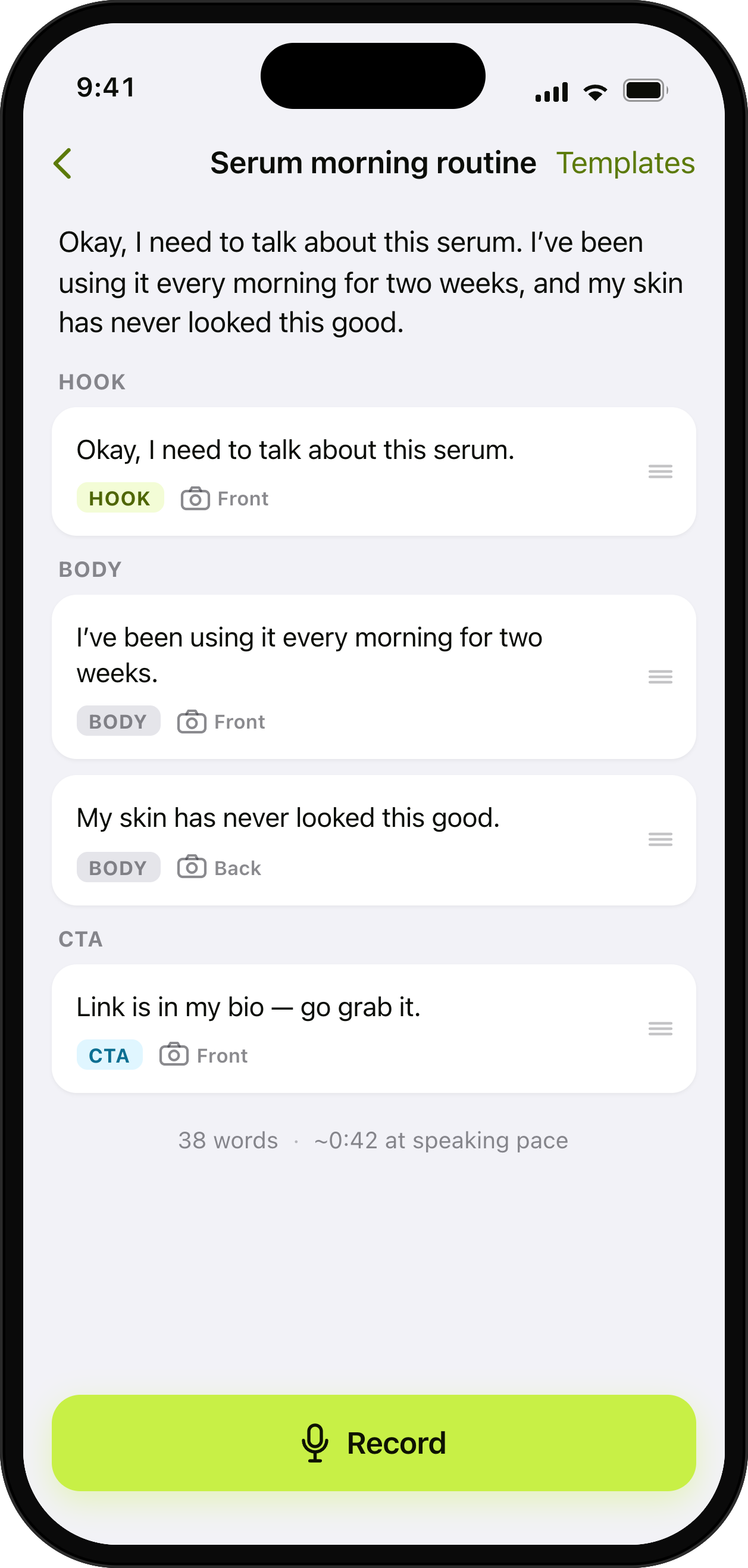
Write or paste a script and UGCut splits it into sentences you can tag Hook, Body, and CTA. Start from a template or a blank page.
Teleprompter App for iPhone
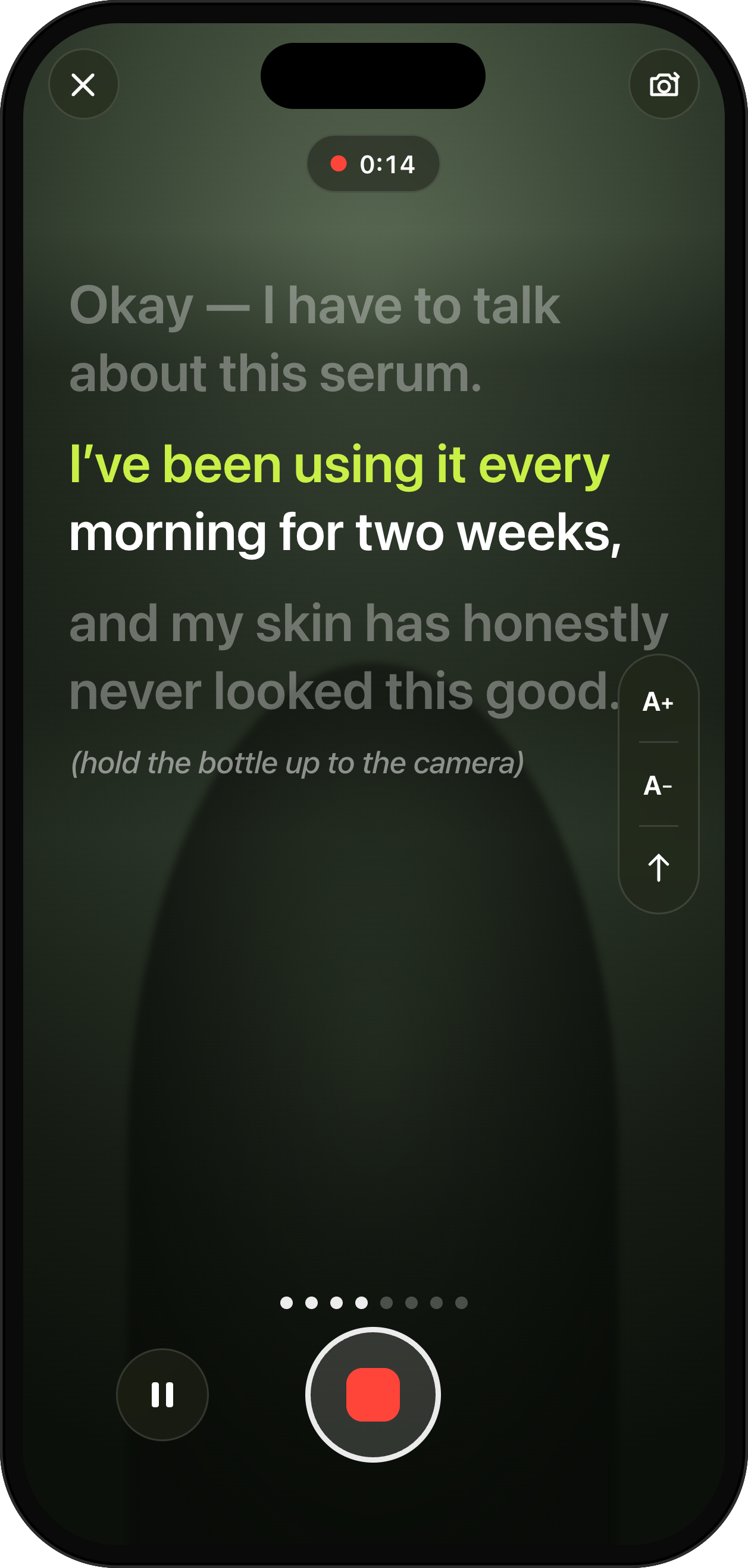
The prompter follows your voice and scrolls at your pace. Flub a line and one gesture re-records just that sentence.
Auto-Cut Video, One Cut Per Sentence
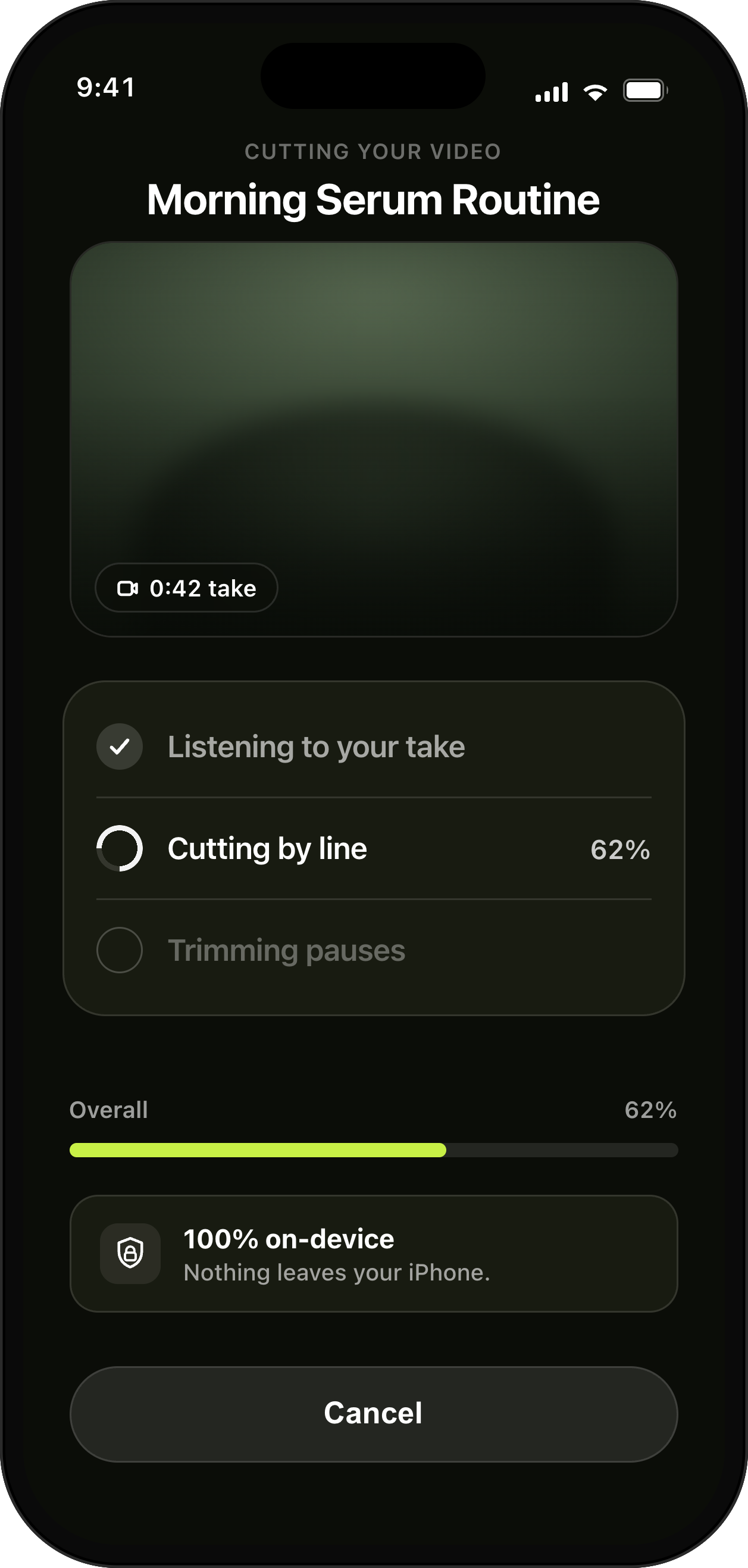
UGCut cuts your take into clips per sentence automatically, anchored to your script, with no scrubbing and no manual trim points.
Takes Review & Re-Record
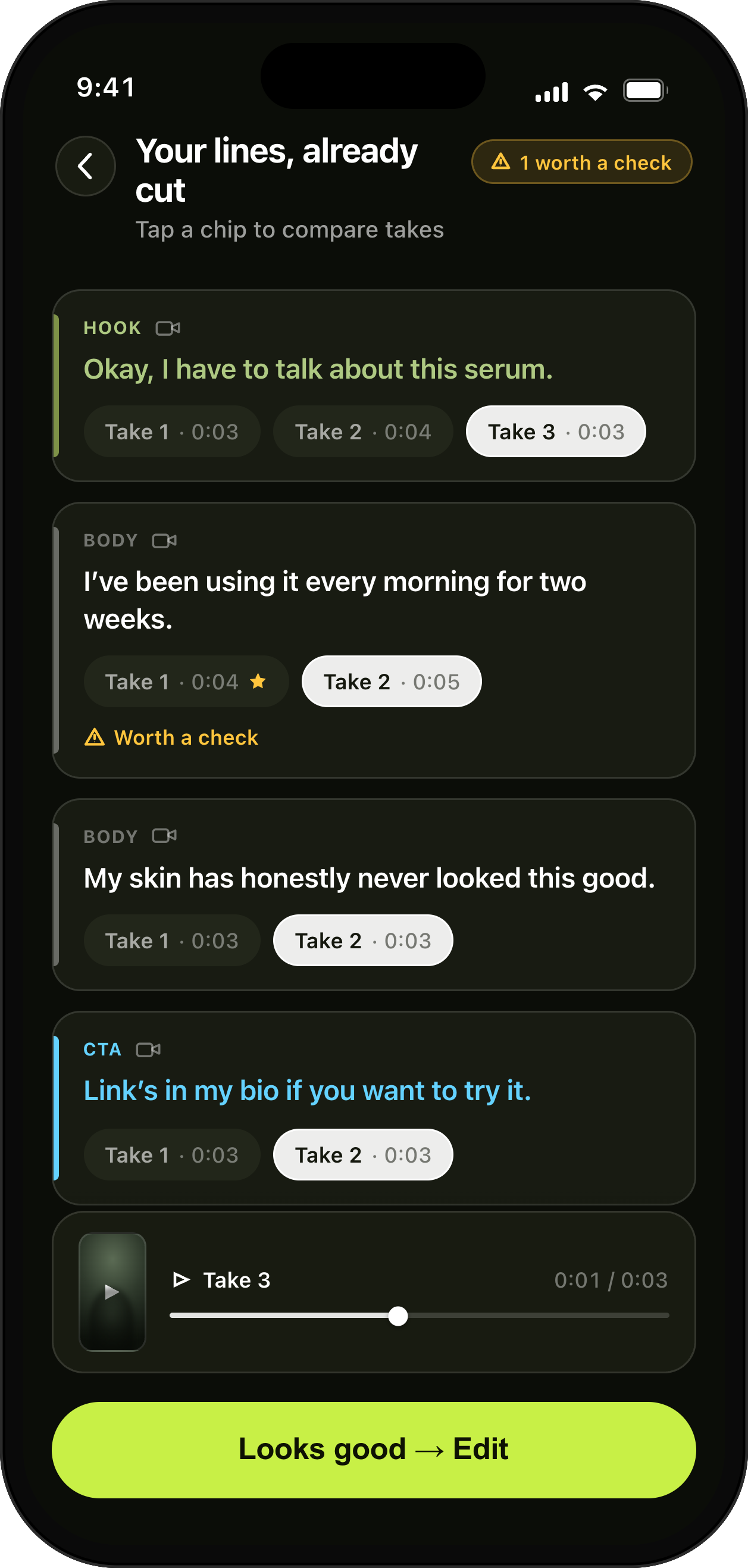
Every sentence keeps its takes. Review by script line, pick the best, or re-record a single sentence without touching the rest.
Auto Captions for iPhone Video, 8 Styles
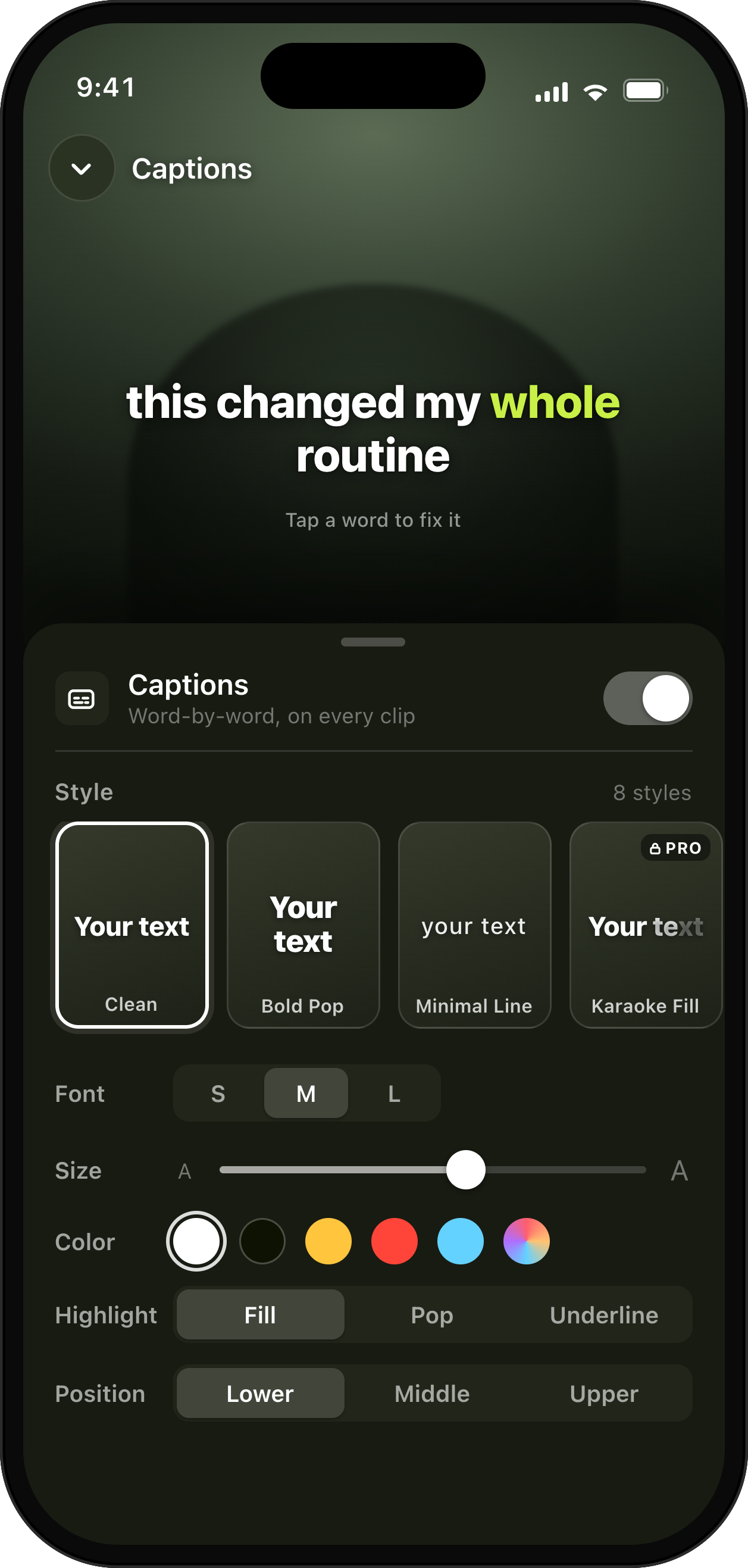
On-device speech recognition burns in animated captions with a word-by-word active highlight. Choose from 8 styles.
Export Presets for TikTok, Reels and Shorts
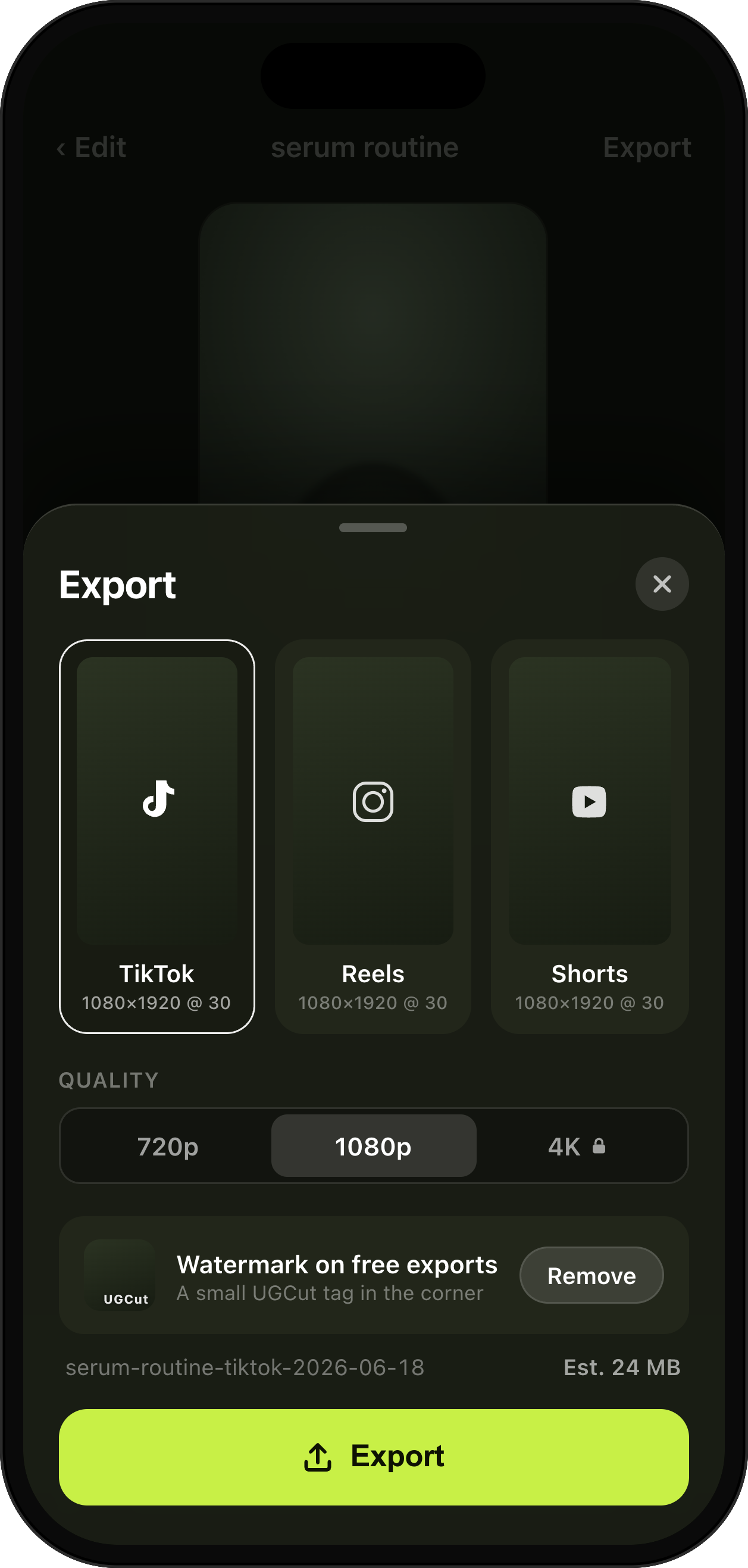
Export portrait-first presets for TikTok, Reels, and Shorts with a safe-zone preview, up to 1080p free and 4K on Pro.
Voice clean-up and audio levelling for iPhone video
Choose Studio, Natural, or Original for project-level voice treatment, then level the final mix on device.
One creator session, seven connected features
UGCut is built around the order a creator already works in. Plan the Scenes, record the pieces, choose the takes, check the Cut, fix the captions and export. Each step keeps its connection to the same Scene, so a change near the start does not turn into a search through an anonymous camera roll or a long timeline.
Video Script Editor with Auto-Segmentation
Start with Scene cards you can actually record
A useful video plan separates what you will say from what the viewer should see. UGCut keeps those two jobs on each Scene card. Add the spoken line, add any direction for the shot, then move the card until the order feels right. A direction-only Scene is valid when the picture needs to carry the moment. A blank card stays a draft until you give it something useful.
This makes the plan easier to change than one long script. You can tighten the hook without disturbing the demonstration, move the proof before the claim, or add a closing shot without rewriting everything. The Scene list also becomes the recording checklist, so the project tells you what still needs a take instead of asking you to remember it.
Read the video script editor with auto-segmentation guideTeleprompter App for iPhone
Record at your pace, one Scene at a time
Open any Scene when you are ready to record it. The teleprompter keeps the current words near the lens and follows your voice, so a pause stays a pause. You do not have to chase a fixed scroll speed or restart because the text ran ahead. Direction-only Scenes keep the prompter clear and let you concentrate on the shot.
Recording Scene by Scene also makes a real creator session less brittle. Shoot every talking-head Scene while the light is right, then move to product close-ups or B-roll. The project order stays intact even when the shoot order changes. If one line needs another attempt, record that Scene again and keep the takes that already work.
Read the teleprompter app for iphone guideAuto-Cut Video, One Cut Per Sentence
Let sentence boundaries do the first edit
UGCut aligns real speech with the words on the Scene card and uses that timing to assemble the first Cut. The result is not a mystery edit made in the cloud. It comes from the structure you authored and the takes you chose. Each spoken section has an owner, which makes the first pass predictable and keeps later repairs small.
You can still trim, split, merge, reorder or remove material in the timeline when a video needs it. The difference is that a clean recording already has a usable structure before you touch a trim handle. That saves the slow pass where you scrub through a long take to find the beginning and end of every sentence.
Read the auto-cut video, one cut per sentence guideTakes Review & Re-Record
Choose the best take without losing the rest
Takes stay with the Scene they belong to. That sounds simple, but it removes the filename puzzle that follows a normal camera session. Three versions of the hook sit together. The product demonstration has its own group. Pick the strongest attempt for each Scene and the Cut updates around those choices.
This is especially useful for variants. Record several hooks, keep one body and one call to action, then build different Cuts without shooting the whole video again. A late correction is small too. Replace the Scene with the wrong product name or offer and keep every unaffected take in place.
Read the takes review & re-record guideAuto Captions for iPhone Video, 8 Styles
Build captions from the take you selected
Captions come from on-device speech recognition and stay tied to the same spoken structure as the Cut. Choose a style, check the text and correct any word before export. Brand names, handles and numbers deserve the closest look because every automatic transcript can get a proper noun wrong.
The captions are burned into the exported picture, so they look the same when the video reaches TikTok, Reels or Shorts. Word highlighting follows the speech, and the editor lets you position captions where they do not cover the product or your face. Free includes the core caption flow. Pro adds the premium styles.
Read the auto captions for iphone video, 8 styles guideExport Presets for TikTok, Reels and Shorts
Check the final frame, then export for the feed
The export step shows the finished Cut with its captions, audio and framing. Check the opening on mute, read every name and number, and make sure the important parts of the frame clear the platform interface. Then export a 9:16 MP4 for TikTok, Instagram Reels or YouTube Shorts.
Free exports reach 1080p and include a small UGCut watermark. Pro removes the watermark, unlocks 4K and adds the premium caption styles. The core work stays available in Free, including Scene cards, recording, takes, the first Cut, caption editing and export. Your own recordings stay on your iPhone throughout that loop.
Read the export presets for tiktok, reels and shorts guideVoice clean-up and audio levelling for iPhone video
Clean up voice audio before you export
Voice treatment is a project-level choice in UGCut. Choose Studio, Natural, or Original, then let the on-device chain run through high-pass, voice isolation, de-ess, compression, presence EQ and peak limiting.
The final mix is measured to -14 LUFS integrated with a -1.5 dBTP ceiling, and export is measured again. The chain can address surrounding sound and level, but room echo and clipped recordings still call for a better source take.
Read the voice clean-up and audio levelling for iphone video guideQuestions about the editing loop
Do I have to record the Scenes in order?
No. Record in the order that fits the location, light or setup. UGCut keeps the project order separately and assembles the selected takes into that order.
Can I replace one bad line without recording the whole video again?
Yes. Record another take for that Scene, choose it in Takes review and keep the Scenes that already work. The Cut updates around your selection.
Does UGCut upload my footage to make captions or cuts?
The core editor uses on-device speech recognition and keeps your own recordings on your iPhone. Scene alignment, captions and export do not require a media upload.
What does the free tier include?
Free includes the core loop from Scene cards through recording, takes, captions and 1080p export. Free exports carry a small UGCut watermark. Pro removes it, adds 4K and unlocks premium caption styles.