Takes Review & Re-Record
Every sentence keeps its takes. Review by script line, pick the best, or re-record a single sentence without touching the rest.
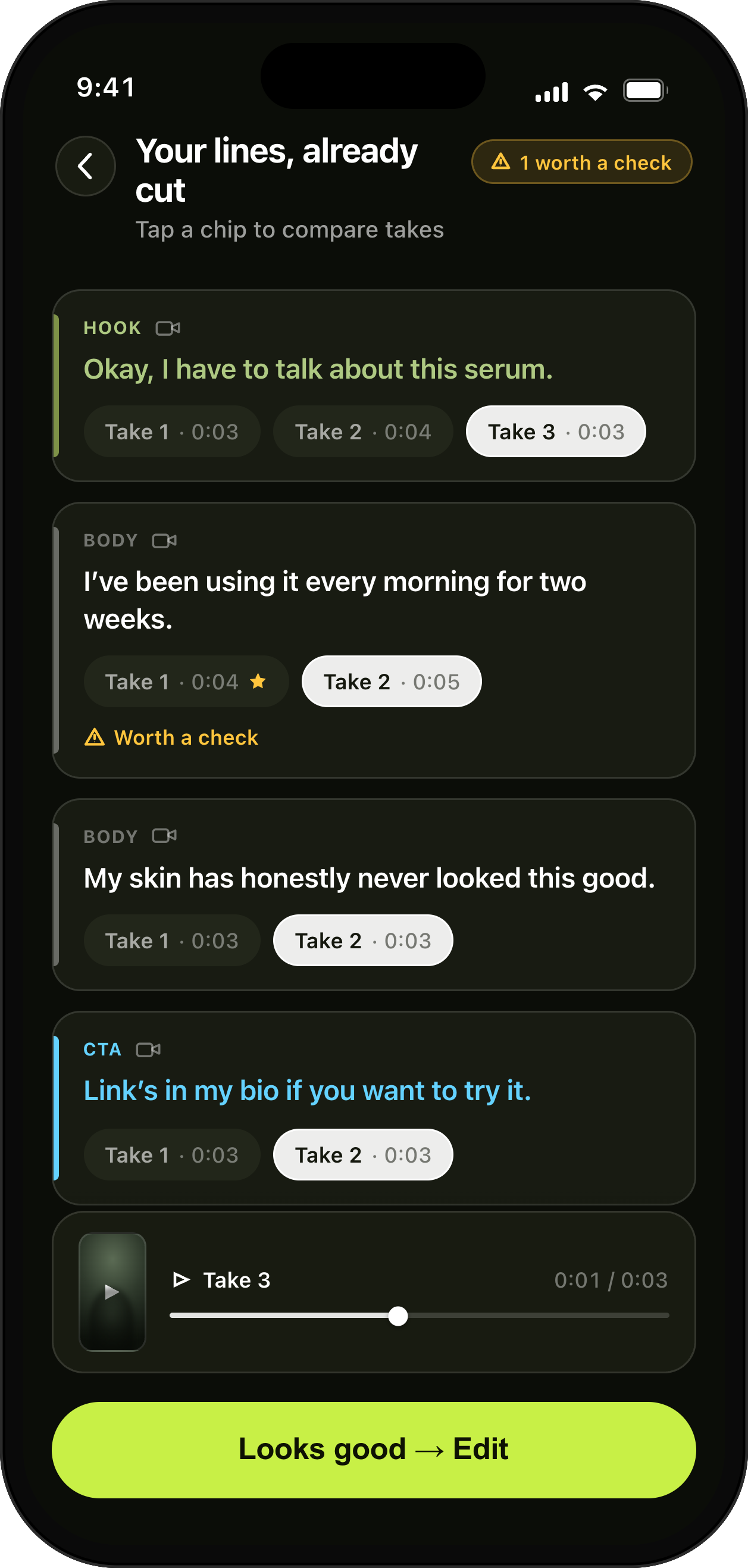
Your lines, already cut. Pick the best take.
How it helps
Fix one flubbed line in seconds instead of re-shooting and re-editing the entire video.
- Organized by script line
- Pick the best take
- Re-record one sentence
Learn more about UGCut on the app overview.
Every sentence in your script keeps its own takes. Review reads line by line, pick the one you want, and re-record a single sentence when none of them is right. You never re-shoot a whole video because of one word, and you never lose a good take by recording over it.
Takes filed by line, not by timestamp
In a camera roll, three attempts at the same video are three long files with confusingly similar thumbnails. Finding the best version of one line means opening all three and scrubbing to roughly the same place in each. Nobody does this. People pick the take that is least bad overall and live with it.
UGCut files takes under the sentence they belong to. Sentence four has four takes because you read it four times, and they sit together where you can hear them back to back. Comparing like with like is the entire job of a review pass, and it only becomes easy once the takes are lined up.
The consequence is that a finished video can be assembled from the best moment of every attempt, which is what an editor with a timeline and an afternoon would do anyway. You just get there without the afternoon.
How to review quickly without second-guessing yourself
Go in order and give yourself one pass. Play the takes for a line, pick one, move on. The temptation is to relitigate sentence one after hearing sentence six, and it almost never improves the video. Delivery reads as consistent when it is chosen quickly, because you are judging all of it in the same mood.
Judge energy first and words second. A take with one slightly clumsy phrase and real conviction outperforms a clean, flat read every time on short-form. If the clumsy phrase is genuinely unusable, that is what the single-sentence retake is for.
Watch the hook with the sound off once. If it does not hold you visually for two seconds, no amount of good audio downstream will save the video, and you should go back and re-record that one line with more energy.
- One pass, in order, one decision per line.
- Energy over precision, except in the CTA where the wording is contractual.
- Re-record rather than settle, because it costs one sentence.
- Check the hook on mute before you finish.
Re-recording one sentence, and what stays untouched
When you re-record a line, nothing else moves. The other sentences keep their chosen takes, the cut keeps its structure, and the captions rebuild for the line that changed. This is the practical reason a UGCut video can be revised the day after a client note arrives without becoming a new project.
Client notes are usually surgical: soften one claim, add the discount code, use their exact CTA wording. In a timeline editor that is a re-shoot plus a re-edit, because the new line has to be recorded in the same lighting, dropped in the right place, and re-captioned. Here it is one line of script and one take.
It is worth keeping your setup for a day after delivering, for exactly this reason. Same room, same distance, same shirt.
Hook variants without a second shoot
A brief that asks for three hook variants is asking for three videos that differ by one sentence. Because the hook is a tagged sentence with its own takes, you record three hooks in one sitting and assemble three deliverables from the same body and CTA.
This also makes your own testing cheap. If you post daily, running two hooks against the same body tells you more about your audience in a week than any amount of guessing, and it costs one extra read rather than one extra shoot.
How many takes is the right number
Two or three per sentence is usually the sweet spot. The first is a warm-up, the second is the one you use, and the third exists because you had an idea about emphasis halfway through the second. Past four you are not improving the read, you are procrastinating on the review.
The exception is the hook. It carries the video, it is one sentence, and it costs seconds, so shoot it four or five times and vary something real between takes: the energy, the first word, whether you start mid-gesture. Reading the same line five times identically is not variation.
For the CTA, one clean take with the exact wording usually beats five expressive ones. The client is checking the words, not the performance.
Keeping your projects tidy
Projects live on your device, and deleting a project deletes its takes from your phone with no copy left in a cloud you cannot see. That is good for privacy and it does mean the tidying is yours to do.
A simple habit: finish a deliverable, export it, deliver it, and only then delete the project once the client has confirmed. Deleting on the day of delivery is how you end up re-shooting for a revision request that arrives on Friday.
Common questions
- Can I re-record just one line instead of the whole video?
- Yes. Every sentence keeps its own takes, and you can re-record a single sentence without touching the rest of the video. The other lines keep the takes you already chose.
- Are my earlier takes kept or overwritten?
- Takes are organized by script line, so multiple attempts at the same sentence sit together and you pick the one you want. Projects live on your device, and deleting a project removes its takes from your phone.
- How do I make three hook variants of the same video?
- Record several takes of the hook sentence. Because the hook is its own tagged sentence with its own takes, each variant reuses the same body and CTA without a second shoot.
Where this sits in the loop
UGCut is a script-first video editor for UGC creators, and this feature is one step of a five-step loop: script, record, auto-cut, takes, caption and export.
Further reading
- How to make UGC videos on your phone
Shooting, reviewing, and delivering in one sitting.
- Auto-cutting video by sentence
Why takes can be filed by line at all.
UGCut is not out yet
The app is in development and is not on the App Store yet. Join the waitlist.
Join the waitlist